Saving money is easy to talk about and surprisingly hard to actually do. The usual approach is to put whatever is left at the end of the month into savings, which works fine until the month gets a little expensive and suddenly nothing is left. Envelop's Goals feature flips that around by treating savings just like any other envelope: you decide in advance how much to set aside, and the math is done for you.
Whether you are saving for a family vacation, building an emergency fund, or putting money away for your kids' college, Goals give your savings envelope a clear target and a timeline to hit it. Here is how it all works.
What is a Goal?
A goal lives inside an envelope and gives it two things: a target amount and a target date. Once you set those, Envelop calculates exactly how much you need to put into that envelope each month, each week, and each day to hit your target on time. No spreadsheet required.
Goals work especially well for envelopes that roll over month to month, like a vacation fund or an emergency savings envelope. Every dollar you put in stays there and builds up over time. The goal just tells you how much to contribute so you stay on track.
Setting Up a Goal
Goals live inside the slide panel for each envelope. To get there, click the detail icon on any envelope row. Inside the panel, tap the Goals tab, then click + Add goal.
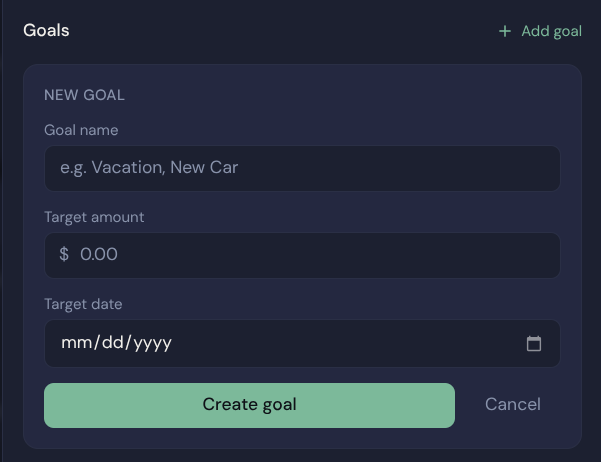
The goal creation form. Give it a name, a target amount, and a date to hit it by.
You will see three fields:
Something descriptive works best. "Family Disney Trip," "6-Month Emergency Fund," "New Roof" — whatever makes it real for you.
The total amount you want saved by the target date. For a vacation, that might be the full estimated trip cost. For an emergency fund, a common target is three to six months of expenses.
When you need the money. Envelop uses this along with how much is already saved to calculate your monthly contribution.
Hit Create goal and Envelop does the rest.
What Envelop Does With Your Goal
Once a goal is created, it shows up directly on the envelope row in your budget. You will see the goal name, a progress bar showing how much you have saved toward the target, and three numbers: how much you need per month, per week, and per day to hit your goal on time.

The Vacation envelope showing the Disney Trip goal. Envelop calculates the monthly, weekly, and daily amounts needed to hit the target.
Those numbers update automatically as you fund the envelope. If you put in a little extra one month, the required amount for the remaining months goes down. If you skip a month, it adjusts upward. It always reflects your current reality, not a stale projection.

A long-term goal like a college fund shows how much is needed each month over many years.
The monthly amount shown is what Envelop suggests you allocate to that envelope this month. When you are building your budget and funding envelopes, use this number as your guide. Fund it, and you are on track. Fund it a little more, and you are ahead.
Viewing Goal Details
For a closer look at any goal, open the envelope's slide panel and tap the Goals tab. Here you will see the full goal card with the progress bar, total saved so far, the target amount, and the time remaining.
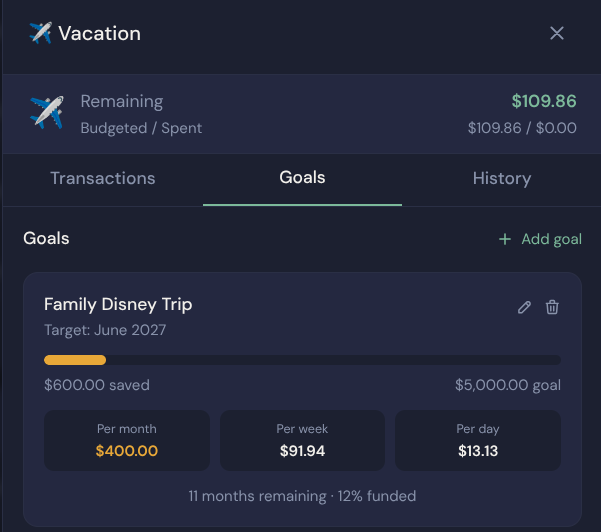
The Goals tab in the envelope detail panel. Fund and Move funds buttons let you act directly from here.
You can also fund the envelope directly from this panel using the Fund and Move funds buttons, which is handy when you are reviewing a goal and want to top it up without navigating back to the main budget view.
A Few Tips for Getting the Most Out of Goals
One goal per envelope
Goals work best when each envelope has a single clear purpose. A "Vacation" envelope with a Disney trip goal, a "College Fund" envelope with a college savings goal, a "New Car" envelope with a car fund goal. Mixing multiple savings targets into one envelope makes the progress tracking harder to interpret.
Make rollover envelopes your savings home
Goals pair naturally with envelopes that have rollover turned on. That way, the money you put in stays in the envelope from month to month and actually accumulates toward the target. If rollover is off, the envelope resets to zero each month and the goal math will not make much sense.
Fund your goals first
When you sit down to budget at the start of each month, treat your goal contributions like any other fixed expense. Fund the emergency fund, fund the vacation envelope, fund the college savings. Then allocate the rest. This is the zero-based budgeting way: savings are not an afterthought, they are a line item.
Let the numbers guide you, not stress you
If the monthly amount looks bigger than what you can comfortably set aside right now, adjust your target date rather than abandoning the goal entirely. A slightly longer timeline is better than no timeline at all. You can always move it up later when your budget has more breathing room.
Ready to Start Saving?
Goals turn vague intentions like "I should really save for that vacation" into a concrete monthly number you can act on. Once you see the per-month target right there on your budget, it stops being a someday thing and becomes a this-month thing.
Set up your first goal today and see what it feels like to know exactly how you are going to get there.
Start saving with intention
Envelop is free to try for 14 days, no credit card required. Set up your budget, create your first goal, and see how much easier saving gets when every dollar has a job.
Start your free trial